
Best FiveM Emote Menu in 2026: What to Look For Before You Install One

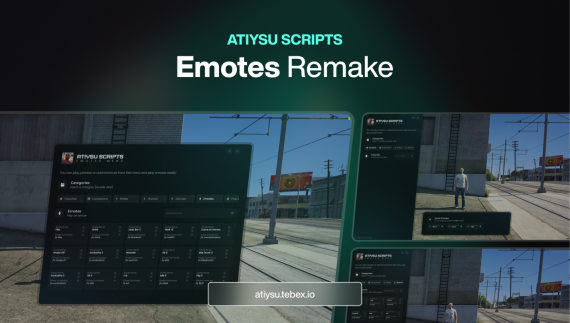
The emote menu is one of the few scripts every single player on a roleplay server touches, often dozens of times per session. Leaning on a wall during a scene, sitting at a bar, handing over a coffee, dancing at a club: all of it runs through the emote menu. That makes it a surprisingly important choice. A clumsy one slows down every scene; a good one disappears into the roleplay.
This guide covers what to look for when you pick a FiveM emote menu in 2026, the free options most servers start with, and when a premium menu is worth it.
What a FiveM emote menu actually has to do
At its core an emote menu maps a name to a GTA V animation dictionary and clip, plays it on the player's ped and stops it cleanly. Everything beyond that is about speed and expression. When you compare menus, these are the questions that matter in practice.
1. Can players find the right emote quickly?
A server easily ends up with several hundred emotes. Scrolling a long list mid-scene breaks immersion, so look for search, clear categories and a favorites list so regular players can keep their go-to animations one click away.
2. Can players see an emote before they play it?
Emote names like "lean4" or "sitchair2" mean nothing until you try them. A preview lets players check the animation before committing to it in front of other people. It sounds small, but it is the single feature players mention most once they have used it.
3. Does it support shared (synced) emotes?
Handshakes, hugs, high fives and partner dances need two players and a synced start. A menu with shared emotes sends a request to the nearby player and plays both sides together, which is what makes these interactions feel natural instead of awkward.
4. Can you add your own animations?
Most servers eventually stream custom animations: gang signs, job-specific poses, props for a café. Check that the menu accepts custom emotes through config rather than requiring code edits, so adding one is a few lines and a restart.
5. Does it fit your framework and your UI?
An emote menu has no real reason to depend on a framework. A standalone menu works the same on QBCore, ESX and Qbox and survives framework migrations. It should also look like it belongs on your server: theme options matter more here than on admin-only tools, because every player sees it.
The free options most servers start with
Many servers begin with a free, community-maintained emote menu such as dpemotes or one of its forks like rpemotes. They are a sensible starting point: open source, a large built-in animation list, and widely known by players coming from other servers. The trade-off is usually the interface. Classic list-style menus work, but finding a specific emote takes longer, there is often no visual preview, and restyling them to match a modern NUI takes real front-end work.
If your server is small or you mostly care about the animation list itself, a free menu is fine. If players use emotes constantly and you care how the experience feels, the interface is where the upgrade pays off.
Checklist: choosing your emote menu
- Search, categories and favorites
- Preview before playing
- Shared emotes with a request/accept flow
- Custom emotes added through config
- Standalone, so it runs on QBCore, ESX and Qbox alike
- More than one UI theme, or a UI you can restyle
- No measurable idle cost when the menu is closed
Where the ATY Emote Menu fits
We built the ATY Emote Menu around exactly this checklist. Players can preview any emote with one click before using it, save emotes to favorites, and find what they need through a fast search. Shared emotes handle synced interactions like handshakes, hugs and dances. Server owners get three UI themes, configurable categories and options, and full support for custom emotes.
It is standalone, so it does not care which framework you run, and it is available as an escrow resource or with full source code. If you are unsure whether it fits your server, ask us on Discord before you buy: if it doesn't run on your server as described, we fix it within 48 hours or refund you.
Frequently asked questions
Do I need to remove my old emote menu first?
Yes. Run one emote menu at a time; two resources listening for the same command or keybind will conflict. Stop the old resource, start the new one and move any custom animations into its config.
Will an emote menu affect server performance?
A well-built menu does nothing while closed. Animations are played client-side by GTA itself; the menu only loads the dictionary and starts the clip, so the ongoing cost should be zero.
Does the emote menu work on Qbox?
A standalone emote menu works on Qbox, QBCore, ESX and custom frameworks, because it does not call framework functions at all.
Featured in this article
Best FiveM Emote Menu in 2026: What to Look For Before You Install One